Wedding Party Roles Explained: Who Does What, and How to Record It
Your wedding party is the group of people with a job on the day: the maid or matron of honour, best man, bridesmaids, groomsmen, ushers and any children who walk the aisle. Each role has a slightly different job, but the titles matter less than everyone knowing what they are actually doing, and you knowing who to ask.
This guide explains what each wedding party role involves, how to choose your people and how many to have, and how to record who is doing what so it flows into your guest list, your top table and your wedding-day itinerary.
Wedding party roles and what each one does
- Maid of honour or matron of honour. The lead attendant for one half of the couple. Traditionally a maid of honour is unmarried and a matron of honour is married, but the job is the same: helping with planning, keeping you calm on the day, looking after the bouquet and rings during the ceremony, and usually giving a speech. Many couples now use "honour attendant" for anyone, and in the UK "chief bridesmaid" is just as common.
- Best man, best woman or best person. The lead supporter for the other half of the couple. They usually organise the stag or hen celebration, keep the rings safe, make sure everyone is where they should be, and give a speech. The title follows the person, not the gender: "best woman" and "best person" are the same job.
- Bridesmaids and groomsmen. Close friends and family who help in the run-up and on the day: getting ready together, joining the photographs, and helping guests feel welcome. There is no rule that the two sides must match in number. The difference from ushers is the job: groomsmen stand with the groom at the front, while ushers are the ones seating guests.
- Attendants. A neutral title for anyone who stands with you and does not want to be filed under "maids" or "men".
- Ushers. They greet guests, show them to their seats and hand out orders of service. A common rule of thumb is about one usher for every 50 guests, and never fewer than two.
- Flower girl, page boy, ring bearer and flower child. Young children who walk the aisle. A flower girl scatters petals, a page boy or ring bearer carries the rings on a cushion (real rings are often swapped for decoys), and "flower child" is the gender-neutral title.
How to choose your wedding party and how many
There is no correct number. Many couples have between two and six attendants each, smaller weddings often have one or two, and some skip the wedding party entirely. A few things make the decision easier:
- Choose people, then titles. Ask the friend or relative you would want beside you, not the one you feel you owe.
- Match the job to the person. Someone organised is better as an usher than a shy relative, and a calm friend is better as your lead attendant than a chaotic one.
- Think about cost and time. Being in a wedding party can mean a dress or suit, travel and a lot of weekends. Say what is involved before you ask.
- Mix and match freely. A best woman for you, a groomsman who is your sister, a page boy who is a niece. Custom titles exist for a reason.
Custom titles: "Man of honour", "Chief bridesmaid" and beyond
Plenty of people do not fit the traditional list. A "man of honour", a "bridesman", a reader, an MC, a family friend who carries the rings: give them a title that says what they do and use it consistently on the day, in the itinerary and in the programme.
How to record wedding party roles in Fizz
Fizz gives each guest an optional wedding party role, so who does what lives in one place instead of a group chat. You can set a role on any guest who has their own invitation. The presets are the roles above, and you can add your own wording of up to 40 characters.
- Open your Registered Guests list in Manage.
- Open the menu on the guest's row and choose Wedding party role.
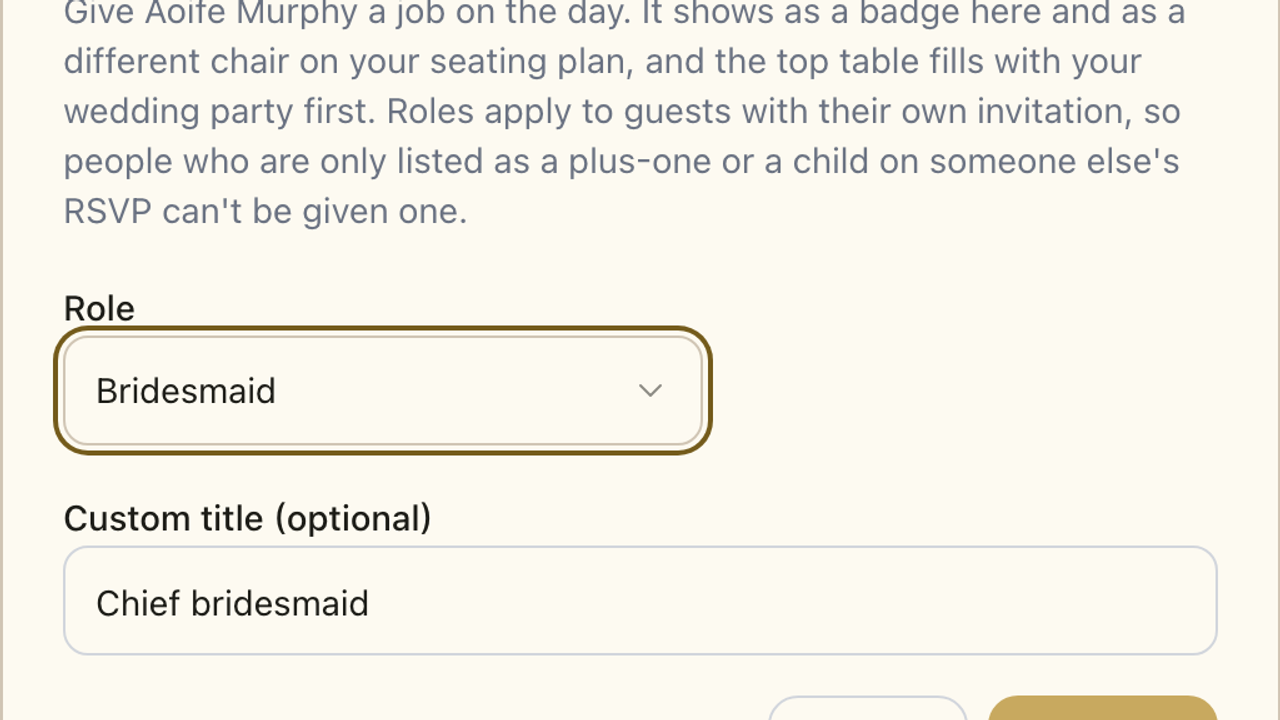
- Pick their role from the list, or choose Other and type a Role name, such as Reader.
- If you want a different title, such as Chief bridesmaid, add it under Custom title (optional).
- Save. The role shows as a badge next to their name, and a Wedding party filter appears above the list so you can see the whole group at once.
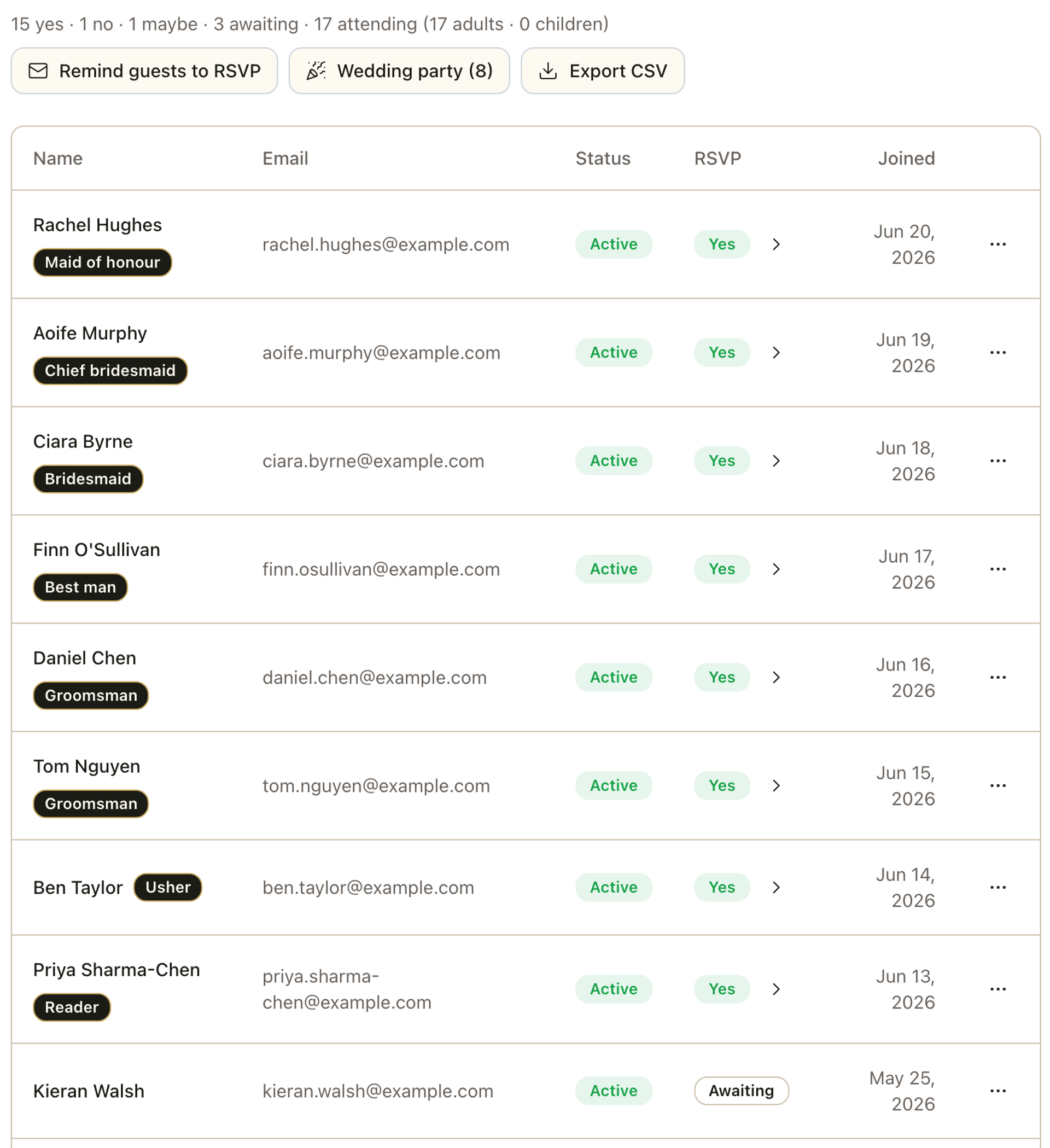
Roles are for guests with their own invitation. People who are only listed as a plus-one, or a child on someone else's RSVP, cannot be given a role yet, so seat a young flower girl with her family at their table instead. The guest list export also has a Wedding party role column if you want a copy for your planner or photographer.
Your top table fills itself
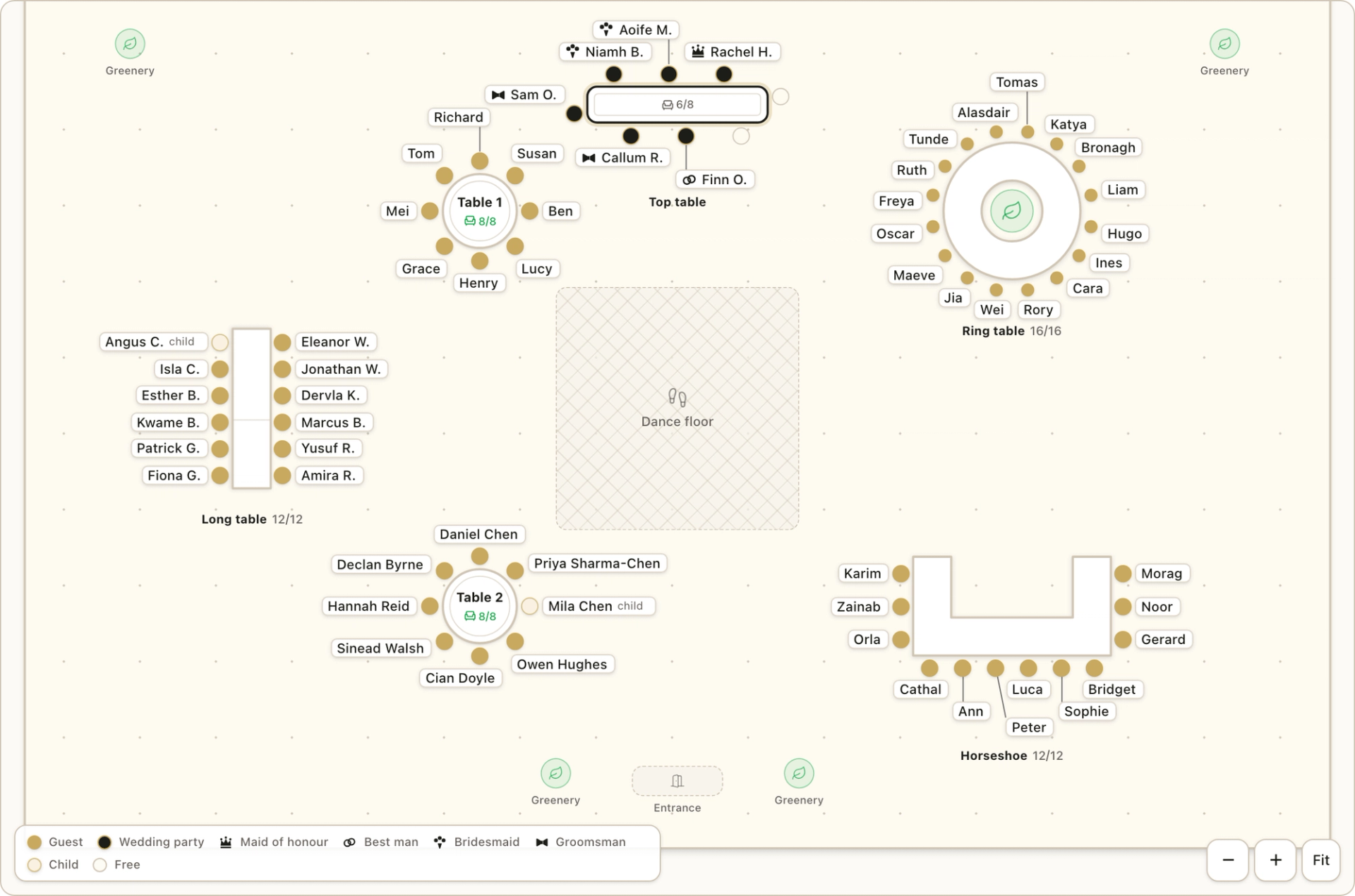
Once roles are set, the seating planner uses them. Add a Top table with + Add table, then choose Arrange for me, and Fizz seats your wedding party there first. It works in a sensible order: honour attendants, then best people, then bridesmaids, groomsmen and attendants. Ushers, children and custom "Other" roles are seated like any other guest.
Two seats are held back for the two of you, or none if you have a sweetheart table. A household is seated whole or not at all, and if someone does not fit, Fizz names them so you can decide. Party members also get a distinct chair on the plan and a legend entry, so you can see them at a glance. Everything can still be moved by hand.
If you are still deciding on the shape of the top table, see our guide to wedding table layouts, and for the wider job of seating everyone, see how to plan a seating chart for a big wedding.
Itinerary items only your wedding party sees
The most useful thing a role does is decide who sees what. The Fizz wedding itinerary lets you mark an item as visible to Everyone, Wedding party only, or Specific roles, so the best man can have "bring the rings" on his schedule without it appearing on your granny's. Guests outside the group do not see those items at all. You can preview the itinerary as any role, and it only reaches guests once you switch on Show to guests.
If you want a schedule to build from, our free wedding day itinerary template covers the day hour by hour.
What guests see
Your guests do not see each other's roles. A guest sees the itinerary items meant for them, and a wedding party item carries a small Wedding party marker so they know it is theirs. The badges, chairs and role filter are for you, and the companion app, coming soon, will show each person their own role too.
Wedding party roles: a quick checklist
- Decide the titles you want, including any custom ones.
- Ask each person, and say what is involved before they say yes.
- Record the roles on your guest list as soon as they accept.
- Add a top table and let the seating planner fill it.
- Put party-only jobs on the itinerary, such as photographs, the rings and speeches.
Recording roles takes a few minutes and saves a lot of "who was doing that again?" on the day. To start, take a look at the Fizz wedding seating planner, where the top table, the party chairs and Arrange for me all live.
Frequently Asked Questions
A place to return to, whenever you like
Create a wedding page you can come back to today, on your anniversary, and for years to come.